Menu bar app for macOS
A Claude usage tracker that shows every account
You launch a long job in Claude Code and it stops halfway: You've hit your session
limit
. Or you have two Max accounts and no idea which still has room this week. Quotum
shows the five-hour and weekly windows of each Claude account in the Mac menu bar,
with the time each one resets when Anthropic gives it, and how long ago it was measured.
Free trial for fourteen days, on the first two lines of the panel. Launch price: €4.99, then €9.99. macOS 26 or later.
you@mac billing % claude
✻ Welcome to Claude Code!
/help for help, /status for your current setup
cwd: /Users/you/Projects/billing> Migrate the invoices to the new schema, then run the tests
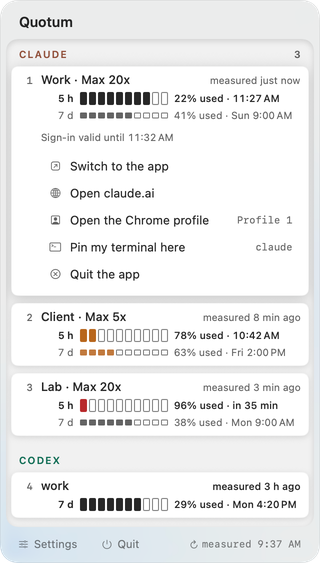
The five-hour session and the week, on separate lines
Anthropic counts Claude usage in two windows: a five-hour session and a weekly limit. A week at 91% no longer hides behind a session at 7%.
Each line has a ten-box gauge whose filled boxes show what is left, the share used, and, when Anthropic gives it, the time the window resets.
An account whose week is used up is spent until it resets, even if its five-hour window looks full. Measured within the last hour, it folds into one line at the foot of its group, under “Recharging”, with a moon and, when it is known, the time it comes back. It keeps its full row if its app is signed in to another account or if Anthropic's usage interface shows usage credits still able to bill; local usage history cannot show them.
Every account, not just the signed-in one
Quotum lists your Claude accounts side by side, numbered: with the panel open, ⌘1 to ⌘9 unfold the first nine. Cursor, Codex and other tools share the panel (Claude Code vs Cursor).
The account Claude Code is signed in to is measured from Anthropic's usage interface. Other accounts show their latest figure and its age. An account with nothing measured says “No measurement yet” and shows no gauge: an empty one would read as run dry.
How old is this number?
Beside each account's name, Quotum writes how old its figure is (“measured 3 h ago”). It measures every five minutes by default, less often when your Mac is idle, on battery saver or offline.
Then open the right account
Open the account that has room: its own copy of the desktop app, claude.ai in its Chrome profile, or your terminal pinned to it, where Claude Code resumes that folder's last conversation if it finds one. See multiple accounts on one Mac.
Where the figures come from
Quotum reads the sign-in Claude Code keeps on your Mac once you track Claude: no API key, no browser cookie. A few local sources are read whether tools are tracked or not, among them the usage history that Claude Code writes itself and the end of the Codex CLI session logs, the transcripts of your sessions: What Quotum reads on your Mac.
Read this before you buy. Anthropic does not provide for a third-party app reading Claude's quota with Claude Code's sign-in. The risk falls on your account, up to its suspension, and it is set out in full on the pricing page.
Compared with other Claude usage trackers
Some menu bar apps are free and open source, cover more tools, or switch the active account. Quotum opens the account you just measured and dates each figure: see the comparison, Quotum vs CodexBar, or how to check your Claude usage without an app.
FAQ
Is there a way to monitor Claude usage from the Mac menu bar?
Yes. Quotum is a macOS menu bar app that shows the remaining usage of Claude Code, Codex, Cursor and other AI coding tools, for several accounts.
Does it show Claude Code usage or claude.ai usage?
Both, since they are the same budget: Anthropic counts claude.ai, Claude Code and Claude Desktop towards the same limits. Quotum shows the five-hour and weekly windows of that shared budget.
Does it need an API key or browser cookies?
Not for your Claude plan: it reads the sign-in Claude Code already keeps in your Keychain, and only once you choose to track Claude. A key is needed only if you choose to: a Claude Enterprise admin key you paste to follow spend.
Can it switch the account Claude Code uses?
Not the account Claude Code is signed in to: Quotum writes none of its credentials. It pins your terminal to an account instead, and opens that account's own copy of the desktop app.